Saturday, October 28, 2017

How to reuse function in laravel inside different controller (PHP TRAITS)


Hi guys, I'm back! :D

There a time where we need to use the same function in different controller. To
achieve this, we can use trait.

What is trait? well it like a class but you don't have to initiate it while using it.
Refer here. PHP Traits

So how should we start? refer super easy steps below.


1) Create you Traits Folder. (You can put it anywhere you want but I will store it inside my app folder).

app/Http/Traits  (This is Laravel Folder Structure)


2) Next, you create a file inside the folder. For example I had already created HashPassword.php
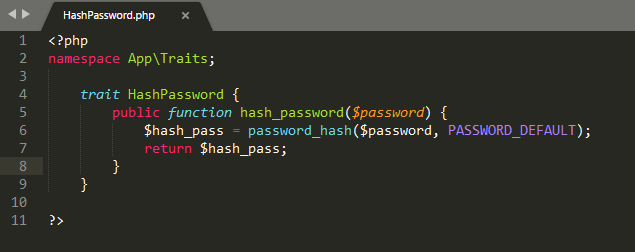


Make sure that you input the namespace so that your controller can detect your trait.

3) Next, Inside your Controller  (For example mine is LoginController)

Just insert the code that I circle and you should be able to use the function inside your trait file. (Change the code according to your needs)


Thanks for the support guys! It is the first time where my blog able to reach 2k+ view in just 1 week.

Support me by follow me on google+ or follow my facebook page for more easy tutorial! :)

Thursday, September 28, 2017

Solved "openssl config failed: error:02001003:system library:fopen:No such process" for Nodejs Window 10


If you get this kind of error after installed nodejs in window 10, it means that your ssl is not pointed  correctly.

So you have to point to the correct path.

1) echo %OPENSSL_CONF% (See your openssl path)
2) set OPENSSL_CONF=C:\OpenSSL\bin\openssl.cnf (Set your openssl path)

After that try and type npm -v again in cmd. You should be able to proceed without error.


Thanks for watching my blog. Do follow me on google+ or like my facebook page for more! :)

Monday, September 11, 2017

Redirect http to https in laravel


Redirect http to https in laravel is easy, all you have to do is just create a
middleware and attach it to your route.

1. Create a middleware.

namespace MyApp\Http\Middleware;

use Closure;

class HttpsProtocol {

   public function handle($request, Closure $next)
   {
           if (!$request->secure() && env('APP_ENV') === 'prod') {
               return redirect()->secure($request->getRequestUri());
           }

           return $next($request);
   }
}

2. Register your middleware in kernel.php

'https_protocol' => \App\Http\Middleware\MiddlewareClassName::class
Note that the namespace path is depends where you store your middleware.
Change it according to where you save your middleware

3. Attach your middleware to your route.

Route::get('profile', 'UserController@show')->middleware('https_protocol');

4. Done. :)

You should be redirecting to https the moment you accessing to http.

Thanks for watching my blog. Do follow me on google+ or like my facebook page for more! :)

Sunday, July 23, 2017

Disable csrf for specific route for Laravel


Hi guys, this tutorial will teach you guys on how to disable csrf for specific Route in laravel.

All you have to do is go to your VerifyCsrfToken Class (It usually located in the middleware folder) and add the route that you want to disable the csrf.

<?php

namespace App\Http\Middleware;

use Illuminate\Foundation\Http\Middleware\VerifyCsrfToken as BaseVerifier;

class VerifyCsrfToken extends BaseVerifier
{
    /**
     * The URIs that should be excluded from CSRF verification.
     *
     * @var array
     */
    protected $except = [
        'stripe/*', // Insert your route here!
    ];
}

Reference
Disable Csrf


Thanks for watching my blog. Do follow me on google+ or like my facebook page for more! :)
Obstrum Facebook Page

Sunday, June 25, 2017

Enlarge Image when hover using css with LIVE EXAMPLE!


This is a simple image enlargement using css. Do click on the link for example in jsfiddle.

Live Example

Thanks for watching my blog. Do follow me on google+ or like my facebook page for more! :)
Obstrum Facebook Page

Tuesday, May 30, 2017

Question that you need to have the answer before proceed to improve mysql database performance.


Optimizing at the Database Level

The most important factor in making a database application fast is its basic design:
  • Are the tables structured properly? 
  • Do the columns have the right data types 
  • Does each table have the appropriate columns for the type of work? 
  • For example, applications that perform frequent updates often have many tables with few columns, while applications that analyze large amounts of data often have few tables with many columns.
  • Are the right indexes in place to make queries efficient?
  • Are you using the appropriate storage engine for each table, and taking advantage of the strengths and features of each storage engine you use? In particular, the choice of a transactional storage engine such as InnoDB or a nontransactional one such as MyISAM can be very important for performance and scalability.
  • Does each table use an appropriate row format? This choice also depends on the storage engine used for the table. In particular, compressed tables use less disk space and so require less disk I/O to read and write the data. Compression is available for all kinds of workloads with InnoDB tables, and for read-only MyISAM tables.
  • Does the application use an appropriate locking strategy? For example, by allowing shared access when possible so that database operations can run concurrently, and requesting exclusive access when appropriate so that critical operations get top priority. Again, the choice of storage engine is significant. The InnoDB storage engine handles most locking issues without involvement from you, allowing for better concurrency in the database and reducing the amount of experimentation and tuning for your code.
  • Are all memory areas used for caching sized correctly? That is, large enough to hold frequently accessed data, but not so large that they overload physical memory and cause paging. The main memory areas to configure are the InnoDB buffer pool, the MyISAM key cache, and the MySQL query cache. 

Optimizing at the Hardware Level

Any database application eventually hits hardware limits as the database becomes more and more busy. A DBA must evaluate whether it is possible to tune the application or reconfigure the server to avoid these bottlenecks, or whether more hardware resources are required. System bottlenecks typically arise from these sources:
  • Disk seeks. It takes time for the disk to find a piece of data. With modern disks, the mean time for this is usually lower than 10ms, so we can in theory do about 100 seeks a second. This time improves slowly with new disks and is very hard to optimize for a single table. The way to optimize seek time is to distribute the data onto more than one disk.
  • Disk reading and writing. When the disk is at the correct position, we need to read or write the data. With modern disks, one disk delivers at least 10–20MB/s throughput. This is easier to optimize than seeks because you can read in parallel from multiple disks.
  • CPU cycles. When the data is in main memory, we must process it to get our result. Having large tables compared to the amount of memory is the most common limiting factor. But with small tables, speed is usually not the problem.
  • Memory bandwidth. When the CPU needs more data than can fit in the CPU cache, main memory bandwidth becomes a bottleneck. This is an uncommon bottleneck for most systems, but one to be aware of.

Thanks for watching my blog. Do follow me on google+ or like my facebook page for more! :)
Obstrum Facebook Page

Wednesday, May 24, 2017

How to create release in git in SourceTree (Window) (Mac)


1. First of all, make sure that `master` branch and `develop` branch in the same branch. (All you have to do is just merge the develop into the master and it will be in the same level)

(If no `master` brunch just double click the `remote/master` branch to create a local branch OR
 follow the link to put the master here)

2. Now make sure that you in `master` branch.
3. Click Git Flow in the GUI.
4. Click `Create New Release`
5. Enter release name. For example: 0.6.2.0 and click OK. (A new branch is created.)
6. You should see uncommited changes. Commit the Changes.
7. Click `Git Flow` again to complete the release
8. DONE :)


Thanks for watching my blog. Do follow me on google+ or like my facebook page for more! :)
Obstrum Facebook Page

Minus (hour) from a datetime in Mysql


DATE_SUB(in_time, INTERVAL 8 HOUR);

Easy :)

SOURCE

Thanks for watching my blog. Do follow me on google+ or like my facebook page for more! :)
Obstrum Facebook Page

Sunday, May 21, 2017

Create a middleware in laravel


Hi guys, this tutorial will cover on how to create middleware in laravel.

If you guys forget the syntax on how to create a project using laravel, you guys can go to this link.

Create project using Laravel

Alright so let start.

The syntax for creating middleware is

php artisan make:middleware Middlewarename

You should see the middleware at App/Http/Controllers/Middleware

Let said that we want to create a route that only accessible to admin.

1) Create a middleware (php artisan make:middleware Middlewarename)

2) Go to web.php and register a new route.

Route::get('admin', function(){
     echo "You have access";
});

3) Go to middleware that just being created and put session inside

4) Register your middleware in kernel.php

'admin' => \App\Http\Middleware\MiddlewareClassName::class

Note that the namespace path is depends where you store your middleware. Change it according to where you save your middleware

5) Edit web.php to use the middleware that we just created.

Route::get('admin', function(){
     echo "You have access";
})->middleware('admin');

6) You should be good to go

By the way, you can also group your route using one middlware.

Route::group (['middleware' => ['admin']], function() {

      Route::get('admin', function(){
          echo "You have access";
     });

});


Thanks for watching my blog. Do follow me on google+ or like my facebook page for more! :)
Obstrum Facebook Page

Mysql LIMIT Query Optimization technique


1) Make sure it uses index It is very important to have ORDER BY with LIMIT executed without scanning and sorting full result set, so it is important for it to use index

For example if I do SELECT * FROM sites ORDER BY date_created DESC LIMIT 10; I would use index on (date_created) to get result set very fast.  

 2)  Now what if I have something like SELECT * FROM sites WHERE category_id=5 ORDER BY date_created DESC LIMIT 10;
 
In this case index by date_created may also work but it might not be the most efficient – If it is rare category large portion of table may be scanned to find 10 rows. So index on (category_id, date_created) will be better idea.

Thanks for watching my blog. Do follow me on google+ or like my facebook page for more! :)
Obstrum Facebook Page

Can you block direct access to .js file


Answer is you can still block it, but not 100%.

1) Obfuscate the code YUI Compressor
2) If you have direct access to.htaccess, you can rewrite by preventing access to .js file. http://stackoverflow.com/questions/6335644/how-can-i-block-direct-access-to-my-javascript-files
3) Write another .js file and include it to the .js file that you want user to block. So if user access the .js file, the code will not shown.


However, the main case in which I want to really 'hide stuff' is when I'm publishing an email address.
Note, there is the problem of Chrome when you click on 'inspect element'. It will show your original code: every time. This is why obfuscation is generally regarded as being a better way to go.

Thanks for watching my blog. Do follow me on google+ or like my facebook page for more! :)
Obstrum Facebook Page

Websocket vs Socket Simple Expanation


Websocket and Socket are not the same. Even though they achieve (in general) similar things, they are really different.

WebSockets typically run from browsers connecting to Application Server over a protocol similar to HTTP that runs over TCP/IP. So they are primarily for Web Applications that require a permanent connection to its server. On the other hand, plain sockets are more powerful and generic. They run over TCP/IP but they are not restricted to browsers or HTTP protocol. They could be used to implement any kind of communication.


Thanks for watching my blog. Do follow me on google+ or like my facebook page for more! :)
Obstrum Facebook Page

Useful InnoDB optimizing tips!


9.5.1 Optimizing Storage Layout for InnoDB Tables

  • Once your data reaches a stable size, or a growing table has increased by tens or some hundreds of megabytes, consider using the OPTIMIZE TABLE statement to reorganize the table and compact any wasted space. The reorganized tables require less disk I/O to perform full table scans. This is a straightforward technique that can improve performance when other techniques such as improving index usage or tuning application code are not practical.
    OPTIMIZE TABLE copies the data part of the table and rebuilds the indexes. The benefits come from improved packing of data within indexes, and reduced fragmentation within the tablespaces and on disk. The benefits vary depending on the data in each table. You may find that there are significant gains for some and not for others, or that the gains decrease over time until you next optimize the table. This operation can be slow if the table is large or if the indexes being rebuilt do not fit into the buffer pool. The first run after adding a lot of data to a table is often much slower than later runs.
  • In InnoDB, having a long PRIMARY KEY (either a single column with a lengthy value, or several columns that form a long composite value) wastes a lot of disk space. The primary key value for a row is duplicated in all the secondary index records that point to the same row. (See Section 15.8.9, “Clustered and Secondary Indexes”.) Create an AUTO_INCREMENT column as the primary key if your primary key is long, or index a prefix of a long VARCHAR column instead of the entire column.
  • Use the VARCHAR data type instead of CHAR to store variable-length strings or for columns with many NULL values. A CHAR(N) column always takes N characters to store data, even if the string is shorter or its value is NULL. Smaller tables fit better in the buffer pool and reduce disk I/O.
    When using COMPACT row format (the default InnoDB format) and variable-length character sets, such as utf8 or sjis, CHAR(N) columns occupy a variable amount of space, but still at least N bytes.
  • For tables that are big, or contain lots of repetitive text or numeric data, consider using COMPRESSED row format. Less disk I/O is required to bring data into the buffer pool, or to perform full table scans. Before making a permanent decision, measure the amount of compression you can achieve by using COMPRESSED versus COMPACT row format. 

Thanks for watching my blog. Do follow me on google+ or like my facebook page for more! :)
Obstrum Facebook Page

"Openssl extension is required error " FIXED!


 [Composer\Exception\NoSslException]
The openssl extension is required for SSL/TLS protection but is not available. If you can not enable the openssl extension, you can disable this error, at your own risk, by setting the 'disable-tls' option to true.


navigate to php.ini (Note that php 7 have php.ini-development and php.ini-production, choose one of this and rename it as php.ini)

Set your path (Line 738)

extension_dir = "C:\EntryPass\Web\php\ext\" ( Make sure that your path is correct, if not it will nto work)

You should be able to create laravel project now. The openssl problem should gone.

Thanks for watching my blog. Do follow me on google+ or like my facebook page for more! :)
Obstrum Facebook Page

"Unabled to retrieve chinese character in xsocket" FIXED!


Turn out that it is the encoding issue. So what I do is i use below solution. Below function will detect what type of string that being received and convert it into the same type.

iconv(mb_detect_encoding($text, mb_detect_order(), true), "UTF-8", $text);

Solution here

Solution Reference

http://stackoverflow.com/questions/4164719/utf-8-encoding-xml-in-php

http://stackoverflow.com/questions/152006/change-mime-type-of-output-in-php

http://php.net/utf8_encode

http://stackoverflow.com/questions/1354263/how-to-load-xml-when-php-cant-indicate-the-right-encoding

Thanks for watching my blog. Do follow me on google+ or like my facebook page for more! :)
Obstrum Facebook Page

Checked checkbox value in multiple chekcbox in javascript


 Here a quick example.

 <input class='try' type="checkbox" name="device" id="1_2" value="1" />
 <input class='try' type="checkbox" name="device" id="10_4" value="2" />
 <input class='try' type="checkbox" name="device" id="5_6" value="3" />
 <input class='try' type="checkbox" name="device" id="4_0" value="4" />
 <input class='try' type="checkbox" name="device" id="8_9" value="5" />
 <input class='try' type="checkbox" name="device" id="3_4" value="6" />

$('.try').click(function() {
    var value = $(this).val();
   var idd= $(this).attr('id');
   var explode = idd.split('_');
    alert('Value before:' +value + ' - Value after:' + value);
});

Example here 

Thanks for watching my blog. Do follow me on google+ or like my facebook page for more! :)
Obstrum Facebook Page

"Boostrap modal not scrollable within modal" FIXED


Turn out that if you want to make you modal scrollable when you use two modal, you have to add this.

#modal_1 {
    overflow-y:scroll;
}

Example here.

Source

Thanks for watching my blog. Do follow me on google+ or like my facebook page for more! :)
Obstrum Facebook Page

How to do loop insert in mysql


Example on how to do loop insert in mysql. This act like a function. NOTE that mysql does not support stored procedure.

DELIMITER $$

DROP PROCEDURE IF EXISTS insert_loop $$

CREATE PROCEDURE insert_loop ()
BEGIN
    DECLARE i int DEFAULT 1;
    WHILE i <=30 DO
        UPDATE test_db.visitor_visit SET visitor_id=i WHERE id=i;
        SET i = i + 1;
    END WHILE;
END $$

CALL insert_loop();

Thanks for watching my blog. Do follow me on google+ or like my facebook page for more! :)
Obstrum Facebook Page

"Unable to execute exec php " FIXED (Apache permission issue)


  1. Go to Control Panel->Administrative Tools_>Services
  2. Select the Apache service and hit Properties
  3. On the Log On tab, click 'This account:' instead of 'Local System account', and then find the User account of Windows user who's normally logged on to that terminal
  4. Restart Apache
    Source
Thanks for watching my blog. Do follow me on google+ or like my facebook page for more! :)
Obstrum Facebook Page

"Unable to display chinese character in dompdf laravel 5.3" FIXED!


I spent quite some time to discover the problem of this and the solution is so simple and make me look silly.

The reason why you unable to display chinese word is because dompdf default font not support chinese. Yes include that devaju font!

The font that i found support these chinese character is firefly sung. There might be other fonts that support chinese fonts too, you just have to google it. :)

So in order to include custom fonts into your dompdf, you have to follow these steps.

1) Download load_font.php and place in your project root. load_font.php
2) Next, edit load_font.php


  1. download load_font.php and place in ur project root
  2. Edit load_font.php
  • Change the line require_once "autoload.inc.php";
    to require_once "vendor/autoload.php"
  • Add $fontDir = "storage/fonts"; Create a folder named fonts in your laravel storage folder.
  1. Download your desire chinese supported font and place at your project root. Here one of the website you can download chinese font. Cooltext
  2.  Open Cmd. Navigate to your laravel project and run this command. php load_font.php xxxfont xxxfont.ttf
    eg: you have download simsun.ttf you will do php load_font.php simsun simsun.ttf then you font will be installed to storage/fonts directory. 
  3. The syntax would accept until 4 type of fonts. (Normal, Bold, Italic, Bold-Italic) . If you want to specify font for each of them, you can type php load_font.php xxxfont xxxfont.ttf xxxfont.ttf xxxfont.ttf xxxfont.ttf
  4. Change your fonts using style in html and you should be good to go. 
Thanks for watching my blog. Do follow me on google+ or like my facebook page for more! :)
Obstrum Facebook Page